I’ve moved client sites off more hosts than I can count at this point, and almost every migration started the same way: a slow site, a support ticket that went nowhere, or a renewal invoice that made no sense. Picking a WordPress host isn’t really a branding decision. It’s an infrastructure decision, and the gap between a good one and a bad one shows up directly in your load times, your uptime, and how many nights you spend troubleshooting instead of running your business.
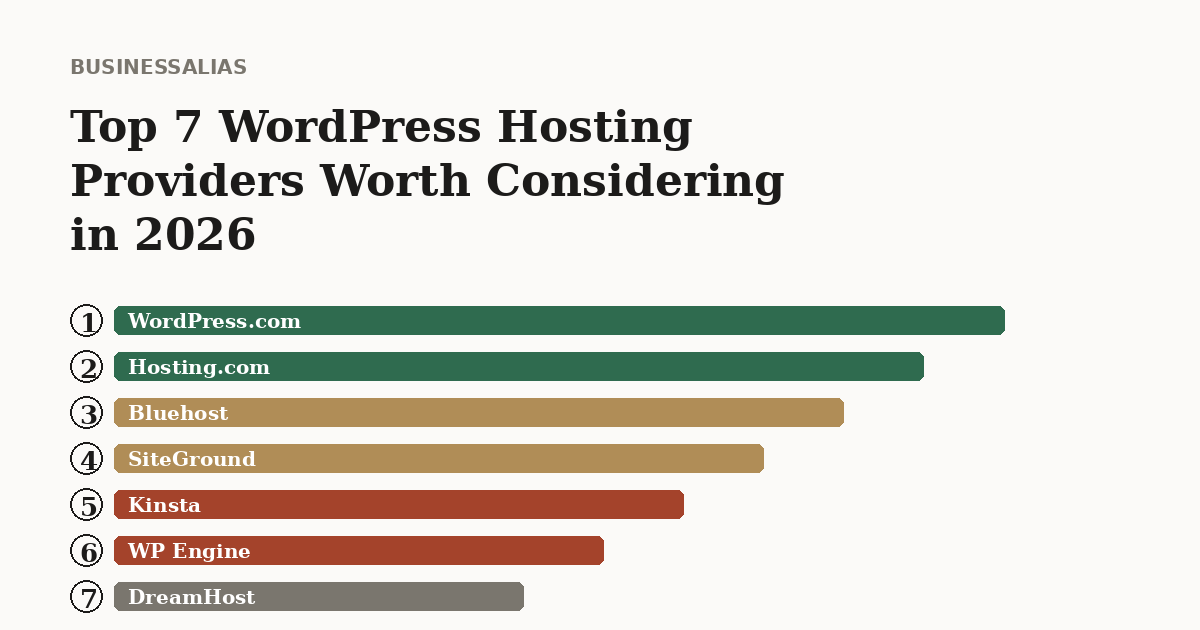
With WordPress still powering well over 40% of the web, the hosting market is enormous and loud, and most “best hosting” lists are really just affiliate rankings dressed up as advice. Here are seven providers actually worth your attention in 2026, what each one does well, and who should look elsewhere.
1. WordPress.com
WordPress.com is the platform most people mean when they say “just use WordPress,” even though it’s technically a hosted service built on top of the same open-source software that powers self-hosted sites. The appeal is simplicity: you don’t manage a server, you don’t think about PHP versions or security patching, and you get a clean editing experience out of the box.
That simplicity comes at a real cost, though, and it’s one a lot of people don’t discover until they’ve already built their site. Lower-tier plans restrict plugin installation, custom themes, and direct code access, all things that self-hosted WordPress users take for granted. If you outgrow the platform later, migrating off WordPress.com to a self-hosted setup is more involved than it should be, because content and settings don’t always transfer cleanly.
Best for: Personal blogs, hobby sites, and anyone who wants zero technical responsibility and is fine trading flexibility for that.
Not ideal for: Ecommerce stores, sites planning to scale, or anyone who wants full plugin freedom.
2. Hosting.com
Hosting.com has built a reputation as a genuinely solid budget-to-mid-tier option, and it earns that reputation through consistency rather than flashy features. Plans typically include a free domain for the first year, generous disk space, unmetered bandwidth, and enough built-in security to not be an afterthought. Multiple independent testing outlets rate it well on real-world reliability, and it consistently shows up as a dependable pick for people who want managed WordPress hosting without paying premium-tier prices.
Where it separates itself from bargain-bin hosts is support quality. It’s fast enough for a standard business site, dependable enough that you’re not checking uptime dashboards nervously, and priced in a way that doesn’t punish you at renewal the way some budget hosts do. It won’t win benchmark speed tests against the premium managed players, but very few businesses actually need that ceiling.
Best for: Small businesses and growing sites that want reliable managed hosting without paying enterprise prices.
Not ideal for: High-traffic ecommerce stores that need dedicated, high-concurrency infrastructure.
3. Bluehost
Bluehost is one of the most recognizable names in WordPress hosting, and it’s one of a small number of hosts officially recommended by WordPress.org itself. That recommendation has held up in large part because Bluehost has consistently targeted first-time site owners: automatic WordPress installation, a dashboard that hides most of the technical complexity, and pricing that starts low enough to make trying it out an easy decision.
What’s changed more recently is the infrastructure underneath. Bluehost has shifted a meaningful chunk of its hosting stack onto enterprise cloud infrastructure, the kind of setup that used to be exclusive to premium managed hosts costing many times more per month, which has noticeably improved its performance and uptime numbers in independent testing. It’s still fundamentally a volume host built for ease of entry rather than raw power, so a complex, high-traffic WooCommerce store will eventually outgrow it, but for a first business site or blog, it remains one of the easiest and cheapest ways to get started properly.
Best for: First-time site owners and small businesses who want an easy setup at a low price.
Not ideal for: Large, resource-intensive ecommerce stores or high-traffic sites needing dedicated performance.
4. SiteGround
SiteGround has built its reputation the old-fashioned way: consistently strong support and consistently strong performance, year after year, in independent testing and user surveys alike. It’s not the cheapest option on this list, but the value proposition is straightforward. You’re paying for a host that answers support tickets quickly, keeps your site fast through built-in caching and a global CDN, and rarely gives you a reason to second-guess the choice.
SiteGround’s dashboard is also worth calling out specifically. It replaced the traditional cPanel interface with its own custom panel years ago, and it remains genuinely easier to navigate for non-technical users while still exposing the tools developers actually want. The tradeoff is that pricing at renewal jumps more than some competitors, so it rewards people who read the fine print upfront rather than getting surprised at year two.
Best for: Business owners who prioritize support quality and consistent day-to-day performance over rock-bottom pricing.
Not ideal for: Extremely budget-conscious buyers who plan to keep costs minimal long-term.
5. Kinsta
Kinsta sits firmly in the premium managed hosting tier, and it’s earned that position through infrastructure most hosts on this list simply don’t offer. It runs on Google Cloud Platform’s fastest virtual machine tiers, giving it a genuine performance edge under real traffic load, and it’s been recognized by independent review platforms as a top-rated hosting provider based on user satisfaction and measured performance alike.
The tradeoff is obvious the moment you look at pricing: Kinsta costs meaningfully more than every other host on this list, often several times more for comparable resources. What you’re buying is headroom, dedicated support from engineers who actually understand WordPress at a deep level, and infrastructure that doesn’t buckle under a sudden traffic spike. For a business where downtime has a direct revenue cost, or a site that regularly deals with unpredictable traffic surges, that premium is a reasonable trade. For a low-traffic brochure site, it’s overkill.
Best for: High-traffic sites, agencies managing multiple client sites, and businesses where downtime is genuinely expensive.
Not ideal for: Small, low-traffic sites where the performance ceiling will never actually get tested.
6. WP Engine
WP Engine essentially invented the “managed WordPress hosting” category, and over a decade later it’s still one of the strongest options for businesses with real compliance or scale requirements. Its proprietary caching system is aggressive and effective, particularly for content-heavy, read-focused sites like blogs and news publications, letting even modest plans absorb sudden traffic surges without falling over.
Where WP Engine earns its keep is enterprise features: staging environments, detailed compliance support for regulated industries, and infrastructure built to handle serious scale. That also means it’s built for a specific kind of customer. Smaller sites without complex needs will find themselves paying for capabilities they’ll never use, and the platform’s learning curve is steeper than more beginner-friendly options like Bluehost or Hosting.com.
Best for: Larger businesses, agencies, and developers who need rigid staging workflows and compliance-grade infrastructure.
Not ideal for: Solo founders or small sites that don’t need enterprise-grade tooling.
7. DreamHost
DreamHost rounds out this list as one of the more consistently well-reviewed budget-to-mid-range options, and it’s one of the few hosts, alongside Bluehost, that carries an official recommendation from WordPress.org. Plans include a free domain, and pricing has remained genuinely competitive relative to the rest of the market, often undercutting bigger names while still delivering solid uptime numbers.
The tradeoff worth knowing about upfront: DreamHost is one of the few hosts in this tier that doesn’t include a CDN by default, which matters if your audience is geographically spread out and page speed is a priority. For a straightforward regional business site, that gap is rarely a dealbreaker, but it’s worth checking before you commit if speed for a distant audience is part of your calculation.
Best for: Budget-conscious buyers who want a reputable, WordPress.org-endorsed host without premium pricing.
Not ideal for: Sites with a widely distributed audience that need CDN performance included by default.
How to Actually Choose Between These
Skip the “which is the best host” question entirely, because the honest answer is that it depends on what you’re running. Ask yourself three things instead.
How much traffic are you actually getting, today, not aspirationally? A 500-visit-a-month site doesn’t need Kinsta’s headroom, and paying for it is just wasted budget. A growing ecommerce store outgrowing shared hosting, on the other hand, will feel WP Engine or Kinsta’s difference immediately.
How technical is your team? If you don’t have anyone comfortable troubleshooting a server issue, prioritize support quality over raw specs. SiteGround and Hosting.com both lean into this. If you have in-house developer capacity, WP Engine’s staging tools and Kinsta’s performance ceiling become genuinely useful rather than wasted.
What does your renewal price actually look like? Every host on this list, without exception, prices its first term more attractively than its second. Before you commit to any of them, find the renewal number and budget against that, not the introductory rate on the landing page. That single habit will save you more money over three years than picking the “best” host on any list, including this one.